
Download myKinCareSF – care management, appointment scheduling, care plan tracking, support services integration, mobile app, healthcare provider tool, caregiver app, patient care coordination, Salesforce integration, real-time updates
Overview
myKinCareSF is a mobile application designed to support care providers in managing essential aspects of patient care. Built as a companion to the well-known myKinCare platform, it leverages a Salesforce-based services infrastructure to deliver a robust, integrated care management solution. The app enables users to view, initiate, and conclude care appointments, streamlining daily workflows and improving operational efficiency. It is tailored for healthcare professionals and caregivers who require reliable tools to coordinate patient care across multiple touchpoints.
Its primary function is to centralize care-related tasks, including scheduling, care plan monitoring, and access to support services. By integrating directly with Salesforce, the app ensures data consistency and real-time updates across platforms. This is particularly beneficial in environments where accurate, up-to-date information is critical to patient outcomes. The app supports care coordination among team members and allows providers to respond promptly to changing patient needs.
Target users include home health aides, social workers, and other frontline caregivers who manage multiple clients. It is especially suited for organizations that rely on structured care planning and require seamless communication between providers and support networks. While the developer did not provide additional details about organizational adoption or enterprise-level deployment, the app’s design suggests scalability for both individual users and small care teams.
Key Features & Capabilities
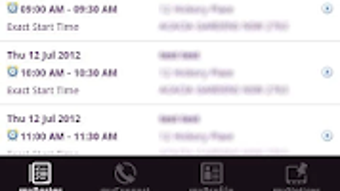
- Appointment Scheduling and Management – Users can view upcoming and past appointments, mark sessions as started or completed, and receive real-time updates on changes. This feature supports efficient time management and reduces scheduling conflicts.
- Care Plan Tracking – The app allows caregivers to monitor individual care plans, update progress, and document interventions. This ensures continuity of care and supports compliance with care standards.
- Support Services Integration – A key capability is direct access to external support services from within the app. Care providers can initiate referrals or request assistance without switching platforms, improving response times and care coordination.
- Real-Time Data Sync – With its Salesforce integration, myKinCareSF ensures that all care-related data is synchronized across devices and systems. This enables consistent access to patient records and reduces the risk of outdated or conflicting information.
- Mobile Accessibility – Designed for iOS and Android, the app supports on-the-go access, allowing caregivers to manage care tasks from any location, which is essential for field-based professionals.
These features collectively enhance workflow efficiency and support better decision-making in dynamic care environments. For example, a caregiver can start an appointment, update the care plan, and request additional support—all within a single interface, minimizing interruptions and administrative overhead.
User Interface, Workflow & Performance
The user interface of myKinCareSF is described as intuitive and user-friendly, aligning with modern mobile design standards. Navigation is structured around core functions such as appointments, care plans, and support services, allowing users to access critical tools with minimal steps. The layout emphasizes clarity, with clearly labeled sections and consistent visual cues to guide users through each task.
Workflow efficiency is supported by streamlined processes for starting and ending appointments, updating care plans, and initiating service requests. The app’s design prioritizes speed and accuracy, reducing the likelihood of input errors. However, the developer did not specify resource usage details, such as CPU or RAM consumption, nor did they provide performance benchmarks under various conditions.
General performance observations are based on typical behavior of mobile applications with similar functionality. Stability is expected to be consistent given the app’s integration with a robust backend platform. Users can expect responsive interactions during regular use, though actual performance may vary depending on device capabilities and network conditions.
Compatibility & System Requirements
myKinCareSF is available for both iOS and Android operating systems, making it accessible to a broad range of mobile users. The app has a file size of 150.4 MB, which is typical for feature-rich applications with integrated backend services. This size may impact installation on devices with limited storage, particularly older models.
Version 2.1.1 was released on October 5, 2023, indicating ongoing development and maintenance. The developer did not specify exact system requirements, such as minimum OS versions, processor speed, or memory thresholds. Compatibility information is limited to the supported platforms, and no details were provided about hardware or software prerequisites beyond the OS.
Users should ensure their device meets standard requirements for running modern mobile applications. The developer did not provide information about offline functionality or cloud dependency, so it is reasonable to assume that consistent internet access is required for full functionality.
Pros and Cons
Pros
- Intuitive, user-friendly interface designed for care providers
- Seamless integration with Salesforce for real-time data synchronization
- Direct access to support services within the app, reducing workflow interruptions
- Comprehensive care plan and appointment tracking capabilities
- Available for free on both iOS and Android platforms
Cons
- Exact system requirements and hardware specifications were not listed
- Performance under low-bandwidth or offline conditions is unclear
- Limited information on customization options for care plans
- No details on multi-user collaboration features or team management tools
- Resource usage (CPU, RAM) was not disclosed
FAQ Section
Is myKinCareSF compatible with my iPhone or Android device?
Yes, myKinCareSF is available for both iOS and Android operating systems. Users can download the app from their respective app stores.
Is the app free to download and use?
Yes, myKinCareSF is currently available at no cost. There are no reported in-app purchases or subscription fees.
Does myKinCareSF require an internet connection?
While the app may offer limited offline functionality, full features such as real-time updates and support services integration likely require a stable internet connection. The developer did not specify offline capabilities.
How often is the app updated?
The latest version, 2.1.1, was released on October 5, 2023. Regular updates are expected to maintain performance, security, and compatibility.
Is my data secure when using myKinCareSF?
As the app integrates with a Salesforce-based platform, which is known for strong security protocols, data is likely protected using industry-standard encryption. However, specific security details were not provided by the developer.
Final Thoughts + CTA
myKinCareSF presents a focused, practical solution for care providers seeking to streamline appointment management and care plan tracking. Its integration with Salesforce ensures reliable data synchronization and supports real-time coordination, which is vital in healthcare environments. The app’s mobile-first design, combined with direct access to support services, enhances efficiency and reduces administrative burden.
While some technical details such as system requirements and performance metrics are not disclosed, the app’s core functionality is well-aligned with the needs of caregivers and healthcare teams. Its free availability further increases its accessibility and appeal.
For healthcare providers managing multiple clients and relying on coordinated care, myKinCareSF offers a valuable tool to improve workflow and patient outcomes. Download myKinCareSF now and experience a more organized, efficient approach to patient care.




.png)


